Welcome
Developing
Reference
Chronos
A fault tolerant job scheduler for Mesos which handles dependencies and ISO8601 based schedules
Overview
Chronos is a replacement for cron. It is a distributed and fault-tolerant scheduler that runs on top of Apache Mesos that can be used for job orchestration. It supports custom Mesos executors as well
as the default command executor. Thus by default, Chronos executes sh
(on most systems bash) scripts.
Chronos can be used to interact with systems such as Hadoop (incl. EMR), even if the Mesos slaves on which execution happens do not have Hadoop installed. Chronos is also natively able to schedule jobs that run inside Docker containers.
Chronos has a number of advantages over regular cron. It allows you to schedule your jobs using ISO8601 repeating interval notation, which enables more flexibility in job scheduling. Chronos also supports the definition of jobs triggered by the completion of other jobs. It supports arbitrarily long dependency chains.
Chronos: How does it work?
Chronos is a Mesos scheduler for running schedule and dependency based jobs. Scheduled jobs are configured with ISO8601-based schedules with repeating intervals. Typically, a job is scheduled to run indefinitely, such as once per day or per hour. Dependent jobs may have multiple parents, and will be triggered once all parents have been successfully invoked at least once since the last invocation of the dependent job.
Internally, the Chronos scheduler main loop is quite simple. The pattern is as follows:
- Chronos reads all job state from the state store (ZooKeeper)
- Jobs are registered within the scheduler and loaded into the job graph for tracking dependencies.
- Jobs are separated into a list of those which should be run at the current time (based on the clock of the host machine), and those which should not.
- Jobs in the list of jobs to run are queued, and will be launched as soon as a sufficient offer becomes available.
- Chronos will sleep until the next job is scheduled to run, and begin again from step 1.
Furthermore, a dependent job will be queued for execution once all parents have successfully completed at least once since the last time it ran. After the dependent job runs, the cycle resets.
This code lives within the mainLoop() method, and can be found here.
Additionally, Chronos has a number of advanced features to help you build whatever it is you may be trying to. It can:
- Write job metrics to Cassandra for further analysis, validation, and party favours
- Send notifications to various endpoints such as email, Slack, and others
- Export metrics to graphite and elsewhere
Chronos cannot:
- Magically solve all distributed computing problems for you
- Guarantee precise scheduling
- Guarantee clock synchronization
- Guarantee that jobs actually run
For the items listed above, you must figure this out yourself.
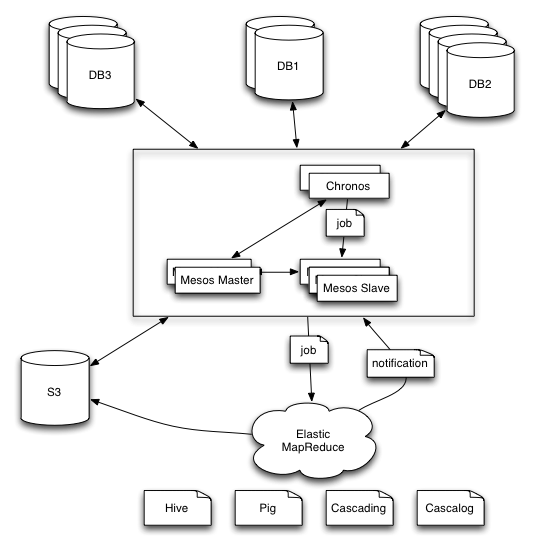
Sample Architecture
Chronos UI
Chronos comes with a UI which can be used to add, delete, list, modify and run jobs. It can also show a graph of job dependencies. The screenshot should give you a good idea of what Chronos can do.
Additionally, Chronos can show statistics on past job execution. This may include aggregate statistics such as number of successful and failed executions. Per job execution statistics (i.e. duration and status) are also available, if a Cassandra cluster is attached to Chronos. Please see the Configuration section on how to do this.
Installation
Chronos can be installed on DC/OS using the following command:
$ dcos package install chronos
Additionally, Mesosphere publishes public Docker images for Chronos. Images are available at https://hub.docker.com/r/mesosphere/chronos/. To run Chronos with Docker, you must have 2 ports available: one for the HTTP API, and one for libprocess. You must export these ports as environment variables for Chronos to start. For example:
$ docker run --net=host -e PORT0=8080 -e PORT1=8081 mesosphere/chronos:v3.0.0 --zk_hosts 192.168.65.90:2181 --master zk://192.168.65.90:2181/mesos